Remove your personal information from people search websites. If you find a stranger-friendly profile with your home address, your phone number and a list of “possible relatives,” you’re not alone. Millions of people discover the same thing, and it’s rarely a pleasant surprise.
Those profiles come from people search websites, and the good news is you can ask many of them to take your details down, usually for free. The less good news is that there’s no single button that fixes everything. Every site has its own process, and some listings come back.
This guide walks you through the whole thing in plain English: finding your information, submitting opt-outs, cleaning up Google, and deciding whether a paid removal service is worth your money. No technical skills needed. If you like practical privacy guides like this one, you’ll find more in our technology section.
Key takeaways
- You can opt out of many people search sites for free, but you have to do it site by site.
- Removing a Google result does not delete the original web page.
- Listings often come back, so plan to re-check every few months.
- Paid removal services save time, but none can promise complete removal.
- If you’re worried about stalking or harassment, start with the sites showing your home address.
In this guide
- What are people search websites?
- What personal information can they show?
- How to find your information
- How to opt out, step by step
- Site-by-site starting points
- Free vs paid removal
- Data removal services worth a look
- How to remove results from Google
- Why your information keeps coming back
- How to stay private going forward
- Your rights in the US, UK, Canada and Australia
- Common mistakes to avoid
- Frequently asked questions
Remove Your Personal Information From People Search Websites
1. What are people search websites?
A people search website lets anyone look someone up by name, location, phone number or email address. To build those profiles, these companies pull from places like:
- Public records, such as property and court records
- Commercial databases and marketing lists
- Online directories and other public sources
- Other data brokers
Some sites show a little for free and charge for full reports. Here are the ones you’re most likely to run into:
| Website | What it commonly lists |
|---|---|
| Spokeo | Names, addresses and contact details |
| Whitepages | Phone numbers and address listings |
| BeenVerified | People search and background reports |
| Intelius | Identity and background information |
| PeopleFinders | Address and people search listings |
| TruthFinder | Background and people search reports |
Finding yourself on one of them doesn’t mean you’re on all of them. It’s worth checking each one.
2. What personal information can they show?
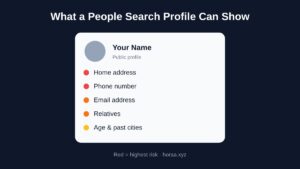
It depends on the site and the records they’ve collected, but here’s what commonly turns up:
- Current and past home addresses. This is the one most people care about, especially for safety.
- Phone numbers. These feed spam calls, scam texts and social engineering attempts.
- Email addresses. They can link your identity across different sites and accounts.
- Relatives and associates. You can show up in a family member’s report even after your own listing is gone.
- Age and background details. Approximate age, past cities and similar information.
Some of it will be out of date or just plain wrong. That doesn’t make it harmless.
3. How to find your information online
Before you ask anyone to remove anything, you need to know where you appear. Set aside about 20 minutes.
- Search your name. Put it in quotation marks and add your city if the name is common, for example “Jane Smith” Manchester.
- Search your phone number. Try different formats, like 555-123-4567 and (555) 123-4567.
- Search your email address. Just don’t type it into random sites that promise to “find your data.”
- Check each people search site directly. Add your city, state or postcode to find the right profile.
- Use a private browsing window. That shows you what strangers see, not what Google thinks you want to see.
- Keep a simple tracker. A basic table is plenty:
| Website | What I found | Request sent | Status |
|---|---|---|---|
| Example site A | Old address | 1 Dec | Waiting |
| Example site B | Phone number | Not yet | To do |
That table is just an illustration, not real data.
Privacy tip: Your tracker will contain sensitive details, so keep it in a password-protected file. Never post screenshots with your real address or number.
4. How to opt out, step by step
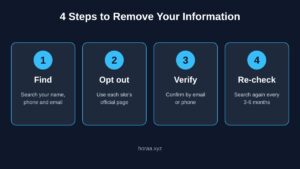
An opt-out request simply asks a site to stop showing or sharing your information. The process is similar almost everywhere.
If your safety is at risk, start with the sites showing your current address and phone number. If you’re dealing with stalking, abuse or threats, contact your local police or a victim support organisation as well. Privacy cleanup helps, but it isn’t a substitute for real-world support.
- Find the right profile. Use your city, age or previous addresses to tell yourself apart from people with similar names.
- Find the opt-out page. Look in the site footer for links such as “Privacy,” “Do Not Sell or Share My Personal Information,” “Opt Out” or “Remove My Information.” Can’t find it? Search “[site name] opt out” and make sure the result is on the company’s own domain.
- Copy your profile URL. Many sites need the exact link to your listing. Double-check it’s yours.
- Submit the request. Share only what’s needed, usually the URL, your name and an email address.
- Verify. Most sites send a confirmation email, and some use a phone check. Be wary of any request for a passport or ID. Only send documents if you’re certain you’re on the official site and it’s truly required.
- Save your proof. Keep the confirmation email or reference number, and note the date in your tracker.
- Check again. After the stated processing time, search for yourself. If the profile is still there, contact the site’s privacy team.
Handy trick: Create a separate email address just for opt-outs. It keeps confirmation emails in one place and keeps your main inbox out of it.
5. Site-by-site starting points
Treat these as starting points, not guarantees. Companies move their pages and change their rules, so always follow whatever the official page tells you today.
Spokeo
- Search for your name and location on Spokeo and open your listing.
- Copy the profile URL.
- Go to the Spokeo opt-out page and submit the URL with your email address.
- Click the confirmation link in the email you receive.
- Check again later. If you have more than one listing, you may need more than one request.
Whitepages
- Find your listing on Whitepages and copy its URL.
- Open the Whitepages suppression request page.
- Paste in the URL and follow the steps on screen.
- Complete any verification it asks for. Phone verification has been part of the process in the past, but requirements can change.
BeenVerified
- Find your listing on BeenVerified.
- Open the privacy or opt-out section from the site footer.
- Submit the listing details, then confirm by email.
- Save your confirmation.
A request sent to another site does not cover BeenVerified, so don’t skip it.
Intelius
- Go to Intelius and open the privacy or opt-out link in the footer.
- Follow the current instructions to suppress your information.
- Verify if asked, and keep a record.
- If you can’t find the option, contact the company’s privacy team through its official site.
PeopleFinders
- Find your listing on PeopleFinders.
- Open its privacy or opt-out page from the footer.
- Submit the request, verify and save your confirmation.
TruthFinder
TruthFinder is easy to forget, so add it to your list. Use the privacy or opt-out link on its official site. Some people search brands share a parent company, and one request might not cover all of them, so read each site’s instructions carefully.
6. Can you remove your information for free?
Yes, for many sites. The US Federal Trade Commission explains that you can submit opt-outs yourself or pay a service to do it, and it has a helpful page on what to know about people search sites that sell your information.
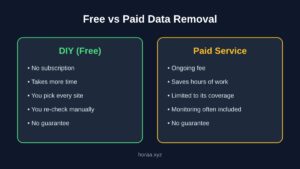
The honest trade-off is time versus money:
| Free (do it yourself) | Paid service | |
|---|---|---|
| Cost | No subscription | Ongoing fee |
| Time | High: you research and submit each request | Low: the service handles most of it |
| Control | You choose every site | Limited to the service’s coverage |
| Monitoring | You re-check manually | Often included |
| Guarantee | None | None |
If you only appear on a handful of sites, DIY is perfectly manageable. If you’re on dozens, paying for help starts to make sense.
7. Data removal services worth a look
These services submit and track opt-out requests for you. Three well-known options are below. Features, prices and country coverage change, so check each official site before you buy.
Optery. Focuses on finding and removing data broker listings. Check which plan includes ongoing monitoring and whether you can see proof of each removal.
Incogni. Automates removal requests to data brokers. Look at its broker list, how often it re-sends requests, and what the cancellation terms are.
DeleteMe. A long-running service that handles removals from people search sites. Check its coverage, how often it reports, and the subscription length.
How I’d choose:
- Confirm the service covers the specific sites where you appear.
- Make sure it supports your country.
- Look for clear reports that show what was removed.
- Read its own privacy policy. You’re handing it sensitive data.
- Check refund and cancellation terms.
Don’t be swayed by big numbers alone. A service that covers 200 sites you’re not on is worth less than one covering the 10 where you are.
8. How to remove results from Google
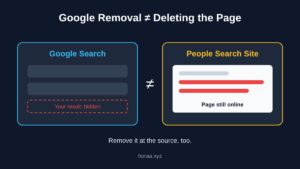
This part trips people up: taking something off Google is not the same as deleting it from the website. Google can hide eligible results from search, but the original page stays online until the site removes it.
Google’s Results about you tool helps you find and request removal of results that show your contact details:
- Open Results about you and sign in to your Google account.
- Select Get started if prompted.
- Add the details you want monitored, such as your address, phone number and email.
- Review the results Google finds.
- Select eligible results and submit removal requests.
- Track the status of each request.
You can also use Google’s personal information removal request page. Depending on its policy, Google may consider requests involving home addresses, phone numbers, email addresses and government ID numbers. It may say no when the information is considered to be in the public interest.
If your address is still on a people search site, contact that site too. Otherwise the result can simply reappear.
9. Why your information keeps coming back
It’s frustrating, but it’s normal. Here’s usually what’s going on:
- Many sources. Brokers collect data from lots of places, so one removal doesn’t touch the others.
- Public records. Property, court and voter records can stay available.
- Refreshed data. A broker can buy new data and create a fresh listing.
- Relatives’ reports. You may appear inside someone else’s profile.
The fix is boring but effective: re-check your key sites every three to six months, search again after you move or open new accounts, and keep your tracker up to date. If that feels like too much, a monitoring service can take over.
Complete, permanent removal can’t be guaranteed. The goal is to make your details much harder to find.
10. How to stay private going forward
- Trim your social media. Hide your address, phone number and daily routines.
- Check privacy settings on every account, since defaults are often more public than you’d expect.
- Use unique passwords and a password manager.
- Turn on two-factor authentication, ideally with an authenticator app or security key.
- Think before you fill out forms. Warranty cards, sweepstakes and loyalty sign-ups often feed marketing databases.
- Use alternatives where you can, like an email alias, a virtual phone number or a PO box for public listings.
- Close old accounts. Deleting an app doesn’t delete the account behind it.
- Search for yourself regularly. It takes five minutes and catches new listings early.
Want more everyday security habits? Browse our latest technology guides.
11. Your rights in the US, UK, Canada and Australia
What you can demand depends on where you live and who holds your data. These are general summaries, and exceptions apply.
United States. There’s no single federal law that lets you delete your data from every broker. The FTC offers guidance on opting out, and several states, including California, give residents rights to know, delete and opt out of the sale or sharing of personal information. California residents should also look at the state’s Delete Request and Opt-out Platform (DROP) via the California Privacy Protection Agency, and confirm its current status and eligibility there.
United Kingdom. UK GDPR gives you a right to erasure in certain circumstances, but it isn’t absolute. Organisations can sometimes have lawful reasons to keep data. The Information Commissioner’s Office explains your right to get your data deleted, and you can complain to the ICO if an organisation doesn’t respond properly.
Canada. Federal and provincial privacy laws, including PIPEDA for much private-sector activity, may let you access your information, challenge its accuracy and withdraw consent in some cases. Start with the Office of the Privacy Commissioner of Canada.
Australia. The Privacy Act and the Australian Privacy Principles let you request access to and correction of your information from covered organisations. Australia doesn’t have a general right to erasure like the UK’s. The Office of the Australian Information Commissioner explains your rights and how to complain.
Living outside the US? Many people search sites are US-based and may handle non-US requests differently. Check each site’s eligibility rules before you submit.
12. Common mistakes to avoid
- Assuming one request fixes everything. It doesn’t.
- Using unofficial “removal” sites. Stick to the company’s own privacy page. Fake ones exist to harvest your data.
- Sending ID you don’t need to send. Only do it if the official site requires it.
- Skipping the confirmation email. Many requests aren’t processed until you verify.
- Never checking the result. A submitted request isn’t proof of removal.
- Mixing up Google removal and deletion. The source page can stay live.
- Believing a guarantee. No service can promise full erasure everywhere.
- Forgetting to repeat the process. Listings can return.
Frequently asked questions
Can I remove my personal information from people search websites for free?
Yes, many sites offer free opt-outs. Find your profile, locate the official removal page, submit the request and complete any verification.
How long does removal take?
It varies, from a few days to several weeks, and some sites need extra verification. Check each site’s stated timeframe.
Can I remove my home address from the internet?
You can ask sites that display it to remove it, and you can request removal of eligible Google results. Public records and other original sources may still show it.
Are paid data removal services worth it?
They can be, if you appear on many sites and want ongoing monitoring. Compare coverage, reporting, pricing and country support first.
Does removing something from Google delete it permanently?
No. It generally affects the search result only. Contact the source site to remove the page content.
Why did my information come back?
Brokers refresh their data from other sources, public records stay available, and you may appear in relatives’ profiles. Regular re-checks help.
Can I remove information about a relative?
Some sites allow requests for another person if you have their permission or legal authority. Follow each site’s procedure.
Do removal services work outside the US?
Coverage varies, and many focus on US brokers. Check country support before you pay.
Final thoughts
You don’t have to fix this in one afternoon. Start with a name search, list the sites showing your address and phone number, and send opt-out requests one at a time. Then tidy up Google and tighten your privacy settings.
If you discover your details on dozens of sites, compare a couple of reputable removal services and see whether ongoing monitoring is worth the cost to you.
Pick one site and start today. Your privacy is worth the effort. And if you’d like more guides like this, head to our technology category.
Sources and official references
- FTC: What to know about people search sites that sell your information
- Google: Results about you
- Google: Remove personal information from Search
- UK ICO: Your right to get your data deleted
- Office of the Privacy Commissioner of Canada
- Office of the Australian Information Commissioner
- California Privacy Protection Agency